The macros that change everything: classes, racials and utilities
Source : Wowhead · Warcraft Tavern · RankedBoost · Zockify · NoobToBoss · Gethe/wow-ui-source · 9 October 2026
Share on WhatsApp (new tab)Share on Facebook (new tab)Share on X (new tab)Switch stance and hit on the same key, heal without changing target, drop your campfire or mark the pull in one press: macros do all that. Open your class, your race or the utilities, copy, or import straight into the game. Every macro is checked for Forever, with your client’s spell names.
How to do it
Step 1 : Open the macro window
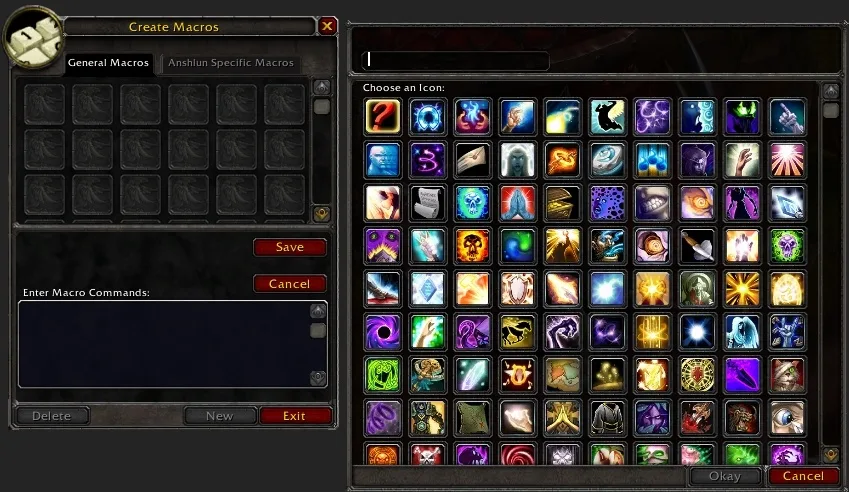
Type /macro in chat. The General tab is for all your characters, the tab with your name for this one only. Click New, give it a name and pick the question mark icon: with #showtooltip, the game then shows the spell’s icon and tooltip.
Step 2 : Pick your client language
A macro must use the exact spell names of your client: a German client won’t understand /cast Charge. Below, the language picker rewrites every macro with Forever’s official names. Watch out for Classic guides copied as-is: Forever renamed some spells, such as Bane of Agony.
Step 3 : Copy, or import in one line
Copy: paste the text into your new macro (Ctrl + V), save, then drag it onto your bar. Import: copies a /run line; in game, press Enter, paste it, Enter. The macro shows up in your character tab (utilities in the General tab). A macro too long for one chat line imports in 2 or 3 lines, pasted one after the other.
Step 4 : The words to know
- /startattack starts your white swings; /stopcasting cuts off the current spell to fire the next one right away.
- [@mouseover] targets what’s under your mouse, [@cursor] places an area spell without a click, [@player] targets yourself.
- [mod:shift], [mod:ctrl], [mod:alt]: several spells on one key, depending on the modifier you hold.
- [stance:1], [nostance]: the warrior’s stance or the druid’s form; /castsequence chains spells press after press; ! avoids cancelling a spell that’s already active.
Without a rank number, /cast always uses the highest rank you know. A macro holds 255 characters at most, and only one spell on the global cooldown goes off per press.
All macros
Classes107 macros
 Warrior14 macros · 13 advanced
 Paladin10 macros · 9 advanced
 Hunter14 macros · 10 advanced
 Rogue13 macros · 12 advanced
 Priest12 macros · 10 advanced
 Shaman8 macros · 7 advanced
 Mage14 macros · 13 advanced
 Warlock7 macros · 6 advanced
 Druid15 macros · 14 advanced
Racials13 macros
 Human1 macro
 Orc2 macros · 1 advanced
 Dwarf2 macros · 1 advanced
 Night Elf2 macros · 2 advanced
 Undead1 macro
 Tauren2 macros · 2 advanced
 Gnome1 macro
 Troll2 macros · 1 advanced
Utilities12 macros
 Camping2 macros · 1 advanced
 Professions2 macros · 2 advanced
 Vendor2 macros · 1 advanced
 Group and markers5 macros · 4 advanced
 Graphics1 macro · 1 advanced
Result
Fewer keys, faster reactions: your interrupts go off instantly, your heals no longer cost you your target and your group knows what to hit.
- Spell names in English, French and German taken from Wowhead Forever.
- Training level and talents from Wowhead’s Forever talent calculator: they don’t always match Classic (Pummel at level 38, Holy Shock at 40).
- Commands, pings, markers and settings checked against the Forever client interface.
Player tip The macros come from fan guides, mostly written for Classic: a macro may still change with Forever’s updates.
More guides
Sources
- Wowhead
- Tank Warrior Macros (Classic) (new tab) · Warrior DPS Macros (new tab) · Holy Paladin Macros (Classic) (new tab) · Hunter Macros (Classic) (new tab) · Rogue Macros (Classic) (new tab) · Healing Priest Macros (Classic) (new tab) · Healing Shaman Macros (Classic) (new tab) · Mage Macros (Classic) (new tab) · Druid Macros (Classic) (new tab) · raciaux Forever (calculateur de talents) (new tab) · objets de camp Forever (new tab) · Ping System (Forever) (new tab) · Macro Guide (new tab)
- Zockify
- Warrior Macros (Classic) (new tab) · Paladin Macros (Classic) (new tab) · Hunter Macros (Classic) (new tab) · Rogue Macros (Classic) (new tab) · Priest Macros (Classic) (new tab) · Shaman Macros (Classic) (new tab) · Mage Macros (Classic) (new tab) · Warlock Macros (Classic) (new tab) · Druid Macros (Classic) (new tab)
- RankedBoost
- Paladin Macros (Forever) (new tab)
- Warcraft Tavern
- Hunter Guide (Forever) (new tab)
- NoobToBoss
- Mage Macros (Classic) (new tab)
- Gethe/wow-ui-source
- interface du client Forever (new tab)